Choose a clear authorized still with a readable subject and enough space for the intended action. Every depicted person must be clearly adult; permission and informed consent are required for real-person media. Use the live upload requirements for the selected model.
How does consent-first Image to Video work?
Start an AI Video NSFW motion test with an authorized image of consenting adults. Choose one event, check input compatibility and the complete live estimate, then compare the completed clip with your starting frame before revising.
| Input | Authorized source image of consenting adults and a motion prompt |
|---|---|
| Output | A new generated video guided by the source image |
| Source image | Use the image formats and file size accepted by the selected setup; check the requirements in the form. |
| Account | Sign in before submitting a generation request |
| Free sign-up Credits | 25 Credits for new registrations; reward eligibility applies. Check your balance after signing in. |
| Pricing | Review the live Credit estimate before submission |
| Models | Available models and settings come from the live Catalog |
| Privacy | Private by default; storage, retention, and deletion follow the Privacy Policy. |
| Safety | People must be clearly 18+; authorization and informed consent are required |
Model availability and output rights
Current limitations
The live Catalog controls which models, settings, and inputs are available. Direct video continuation and some advanced workflows may be unavailable, and commercial clearance depends on the applicable plan or model terms.
Generated outputs can vary, may not be unique, and are not automatically cleared for commercial use unless a particular plan or model expressly says otherwise.
One frame you can use. One movement to try.
Image to Video lets you start the experiment with an image rather than ask a text prompt to invent every visual decision. Choose an authorized picture of clearly consenting adults and decide what should move first. On AI Video NSFW, the source, live model and output choices form one request; review them together before spending Credits. The aim of the opening attempt is to learn how a small movement affects a frame you already understand.
Prepare a still for its first movement
Before uploading, inspect the image as a starting shot: where is the subject, which details matter, and where could movement leave the frame? Then write a brief about change. Describe the event you want to test without assuming every source detail will survive a new generation.
- 01
Check permission and the edges
Use an image you made or have permission to process, with informed consent for any real person. Inspect cropped hands, overlapping limbs and the space around the subject. A movement that immediately exits the frame is a poor opening comparison.
- 02
Give the picture one next event
A portrait could turn toward a window; a standing figure could take one step. Pick one event, identify the part of the frame that should remain important, and avoid asking for a wardrobe, location and camera change in the same attempt.
- 03
Review input, output and Credits together
Check the selected model accepts the source and read its available controls. After choosing the output setup, compare the complete estimate with your signed-in balance. Uploading a source does not imply the submission is covered by your starting allowance.
Choose the movement before submitting
The following illustrative source directions use original AI Video NSFW illustrations. They explain what to ask and what to inspect; they do not document the generator processing these images. Camera and subject examples are choices for a brief, rather than a list of guaranteed model controls.
Swipe horizontally to explore all three examples.
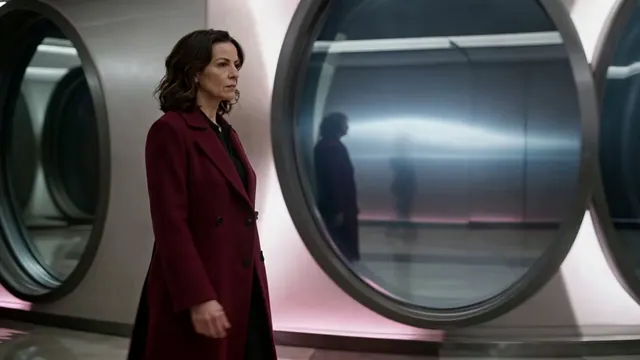
Try a short step
PromptThe clearly mature fictional subject takes one measured step down the corridor. Keep the coat readable and the viewpoint at the same height; avoid adding a camera orbit.
Review the feet and coat hem before increasing the walking distance.
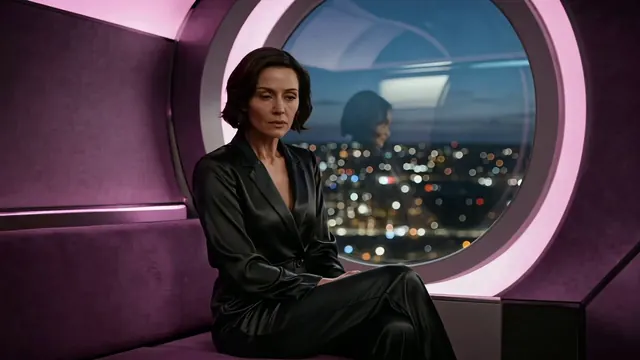
Let the face carry the moment
PromptThe mature fictional subject turns her head gently toward the circular window, then stops. Retain the rail as the main composition anchor. Use restrained camera movement.
Start with a small turn; examine the face at the middle and end.
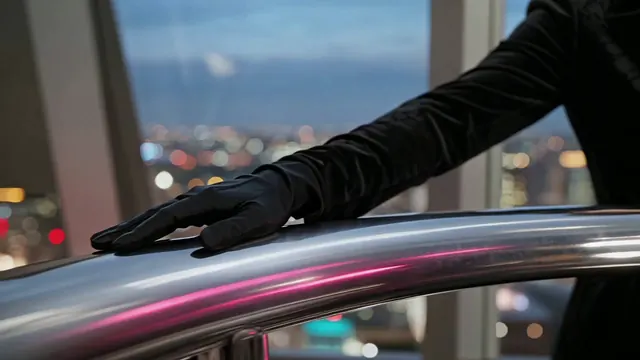
Test movement without a face
PromptFollow the reflection along the chrome rail while the gloved hand rests in place. Keep the evening coat and city lights as quiet supporting elements.
A non-facial detail can help you judge camera motion separately.
Match the live setup to this image
Image to Video starts with a concrete source, but compatible uploads, model availability and output options remain live facts. Check the generator rather than relying on a generic file-limit claim. Revisit the estimate whenever an input or output choice changes.
| Goal | Focus on | Why it helps |
|---|---|---|
| Keep the important detail visible | Source framing and output shape | Inspect whether the selected shape gives the action enough room. A tighter crop can make an otherwise restrained movement difficult to assess. |
| Try the motion before expanding it | A supported short duration | Choose enough time to see the movement settle. The shortest available option is useful only if the event remains legible. |
| Confirm the first request is affordable | Current balance versus full estimate | Check after the source and all available options are selected. The one-time 25-Credit offer is not a promise that any chosen setup fits. |
| Understand a revision | Same source and selected model | Compare the motion prompt while keeping the source stable. A new crop or source image changes the experiment as much as a new instruction. |
Look for the first point of drift
Watch the Image to Video result from its opening frame and identify when it stops matching the intention. This gives a more useful next prompt than simply asking for better quality. Review important details at the beginning, middle and end of the clip.
- The face changes during the turn
- Try a smaller turn with a slower pace. Source likeness is not guaranteed; inspect the new result before saving or sharing it.
- The image becomes a different scene
- Remove location and wardrobe changes from the motion brief. Name the original frame anchor and one event to attempt.
- The movement leaves the frame
- Choose a smaller action or a source with more space around the subject, then check the output shape before submitting again.
- A finished clip will not play
- Check task status before retrying a generation. Playback and network failures are different from a task finalized as Failed.
Image to Video questions
Practical answers about live settings, Credits, account access, and consent-first creation.
Focus on the next event: a head turn, one step or a slow change in viewpoint. Mention a source detail only when it establishes an important constraint, such as keeping the rail central. Rewriting every visible detail can bury the movement you actually want.
Eligible new accounts start with 25 one-time Credits, with anti-abuse checks applying. Whether those Credits cover your request depends on the live estimate after the source, model and output setup are selected. Check the signed-in balance before you submit.
A generated clip can vary from the image, even with a restrained prompt. Compare the first, middle and final frames for face, hands, clothing and background changes. Do not treat a successful upload as a guarantee of exact preservation.
The generator calculates the current request from the selected Catalog configuration. Options are model-dependent and can change over time. Review the complete displayed requirement rather than assuming that all animations use the same Credits.
Only when you have the required rights and their informed consent for the intended processing. Unauthorized likenesses and non-consensual intimate material are prohibited. If permission is uncertain, use your own authorized work or a clearly fictional character instead.
Choose one thing this frame should do next.
Upload the authorized still in Image to Video, write the smallest useful motion brief, and read the complete request estimate above.